Structure a Creative Brief as Data Before You Prompt an Image Model

A creative brief as structured data, not a paragraph (AI generated concept image)
A creative brief for an image model works better as a small data object than as a paragraph: define what you want as fields, keep a function that turns those fields into a prompt, and you can change one field, rerun the render, and get a new prompt without rewriting anything by hand.
One note before the rest of this: I used AI to help organize this piece and clean up the code samples, and I have a working relationship with Virse, a multi-model creative canvas that comes up near the end, so weigh that as you read.
Why the Same Creative Brief Produces Five Different Images
Hand the same brief to five people and ask them to generate an image from it, and you will get five different images, often different enough that they do not look like they came from the same project. The usual explanation is that everyone has a different eye, but the more common cause is simpler: everyone rewrote the brief into their own prompt. One person leads with mood, another leads with camera angle, a third pastes half the brief verbatim and lets the model fill in the rest. A recent write-up on team AI image consistency put it plainly: the output is shaped almost entirely by the prompt, and when everyone writes prompts differently, five people working from one brief end up producing what reads like five separate brands side by side.
That is not a prompting skill problem. It is a representation problem. The brief exists as prose, and prose gets re-interpreted every time someone reads it and turns it into a prompt. If the brief were something a program could read directly, the interpretation step would happen once, in the code that renders it, instead of once per person.
What Structuring a Brief as Data Actually Means
A natural language brief mixes everything together in one block of text: what to generate, what not to do, how the reference image should be used, and what counts as a good result. Nothing in that block is addressable. If you want to change only the color constraint, you have to reread the whole paragraph to find it and rewrite around it.
A structured brief separates those same decisions into named fields. Nothing about the fields is exotic. It is closer to a config file than to a document: a subject, a set of constraints, a role for the reference image, and a list of things the output has to satisfy. Once the brief lives in fields, a small function can render it into whatever prompt format your image model expects, and that function is the only place the wording lives.
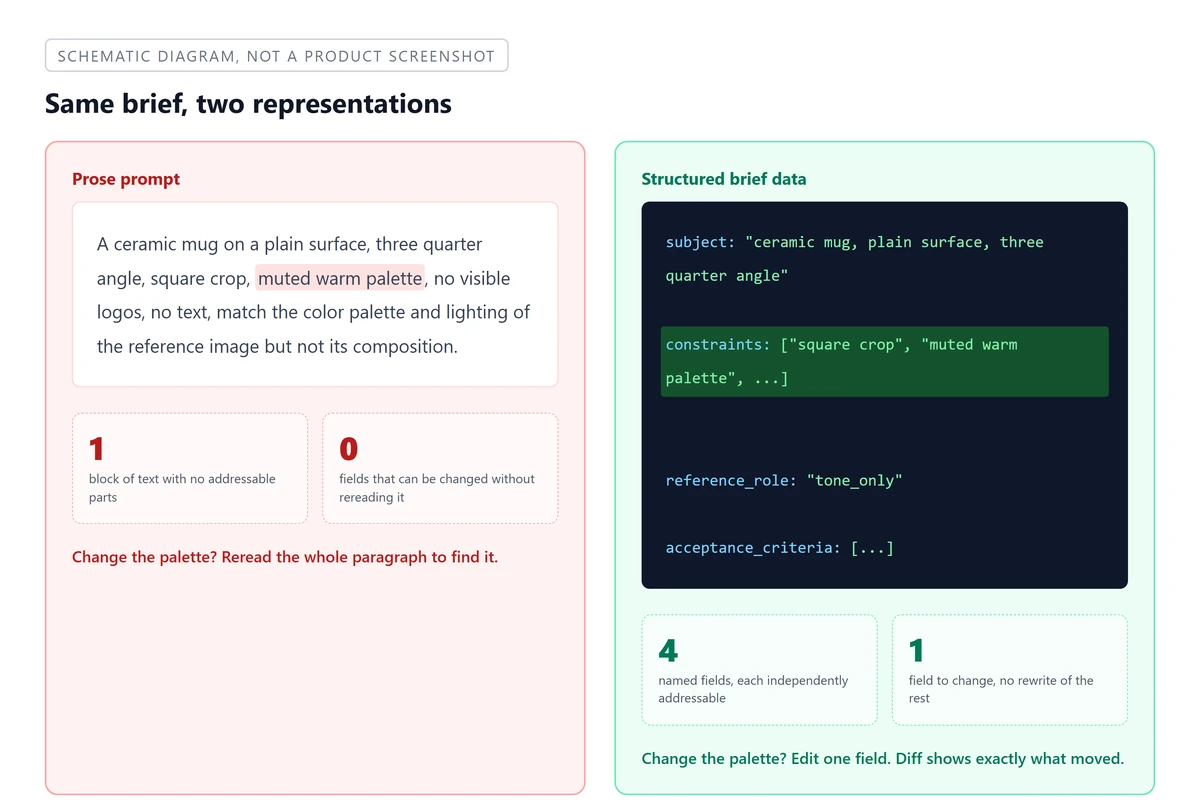 Schematic: the same brief as a paragraph versus as fields you can address one at a time
| Prose prompt | Structured brief data | |
|---|---|---|
| Change one constraint | Reread and edit the paragraph | Edit one field |
| See what changed between two versions | Read both paragraphs side by side | Diff two data objects |
| Hand off to someone else to run | They rewrite it in their own words | They call the same render function |
| Reuse for a variant | Copy, paste, hand-edit | Change one field, rerun |
A field earns its place for a practical reason, not a cosmetic one: it can be read, changed, compared, and handed off by something other than a human rereading prose.
Four Fields That Make a Brief Machine-Readable
A creative brief for an image model needs to answer four questions before anyone can act on it: what to generate, what limits apply, what the reference image is for, and how to tell whether the result is acceptable. Those map to four fields.
| Field | What it captures | Example |
|---|---|---|
subject |
What the image should actually contain | "a ceramic mug on a plain surface, three quarter angle" |
constraints |
Limits on size, palette, composition, and anything explicitly off limits | "square crop, muted warm palette, no visible logos, no text" |
reference_role |
What the reference image contributes to this specific generation | "tone_only" |
acceptance_criteria |
What has to be true about the result for it to count as done | "background is a solid color", "mug outline is not cropped" |
In Python, that is a plain dataclass, nothing more:
from dataclasses import dataclass, field

@dataclass
class CreativeBrief:
    subject: str
    constraints: list[str] = field(default_factory=list)
    reference_role: str = "none"
    acceptance_criteria: list[str] = field(default_factory=list)

mug_brief = CreativeBrief(
    subject="a ceramic mug on a plain surface, three quarter angle",
    constraints=["square crop", "muted warm palette", "no visible logos", "no text"],
    reference_role="tone_only",
    acceptance_criteria=[
        "background is a solid color",
        "mug outline is not cropped by the frame",
    ],
)
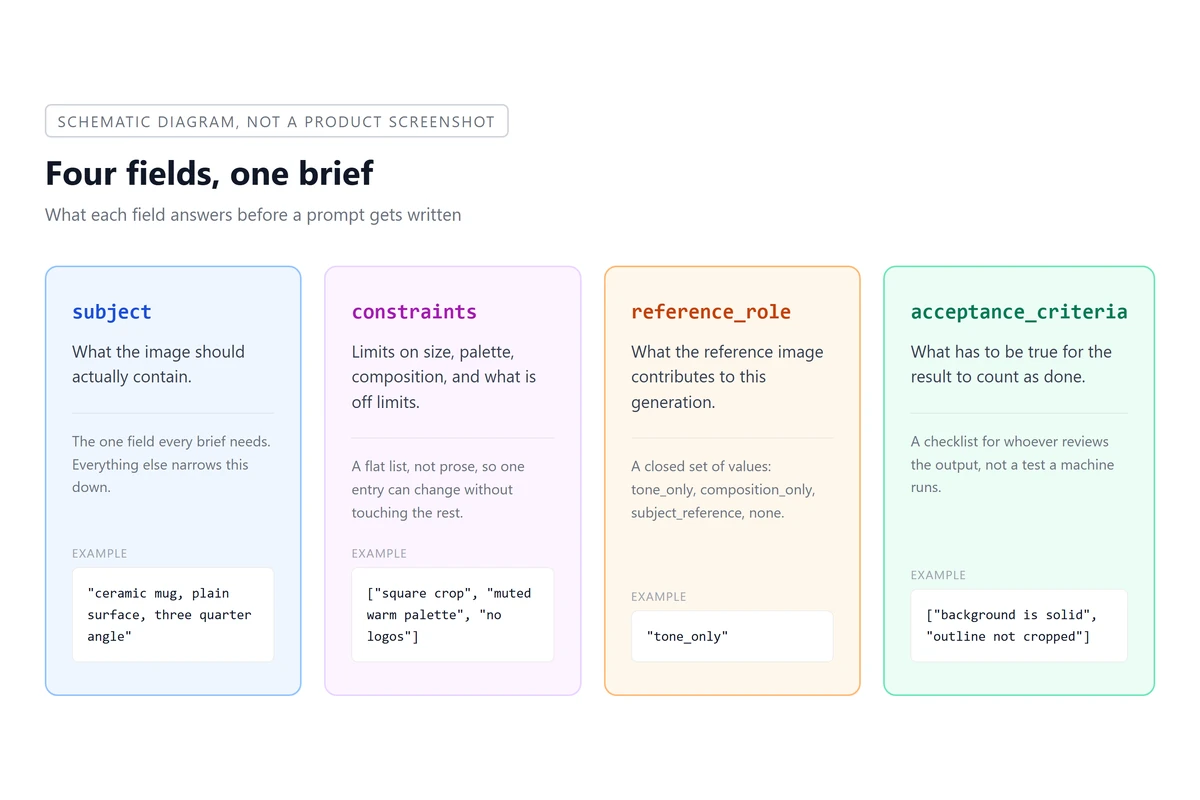 Schematic: the four fields that make a creative brief machine readable
So far this only gives the brief a shape to live in, without checking whether any of the values are correct, and that shape is the part most natural language briefs never get.
Turn the Data Into a Prompt With a Render Function, Not a Validator
It is worth being precise about what this dataclass is for, because "structured" and "developer facing" tends to make people think of schema validation: catching malformed input, raising errors on missing fields, rejecting a brief that does not conform. That is a real and useful thing to build, and it is a different piece of work from what this piece is about. Here, the data has one job: feed a function that renders it into the text a prompt actually needs.
def render_prompt(brief: CreativeBrief) -> str:
    parts = [brief.subject]
    if brief.constraints:
        parts.append(", ".join(brief.constraints))
    if brief.reference_role == "tone_only":
        parts.append("match the color palette and lighting of the reference image, but not its composition")
    elif brief.reference_role == "composition_only":
        parts.append("match the framing and composition of the reference image, but use a different color treatment")
    return ". ".join(parts)

print(render_prompt(mug_brief))
# "a ceramic mug on a plain surface, three quarter angle. square crop, muted warm
#  palette, no visible logos, no text. match the color palette and lighting of the
#  reference image, but not its composition"
The mapping from field to phrase is fixed and lives in one place. Change reference_role from tone_only to composition_only and every future prompt built from this brief picks up the new phrasing automatically, without anyone hunting through old prompt text to find and edit the relevant clause. That is what "data before prompt" buys you: the wording is generated, not maintained by hand.
Give the Reference Image an Explicit Role
Most guidance on using a reference image with an image model converges on the same idea, stated as advice rather than as data: give each reference a single job. One reference for the subject, one for the scene, one for the style, and never hand the model an image without saying which part of it matters. Skip that step and the model has to guess which details to borrow, and it often borrows the wrong ones, copying a composition you only wanted for its color grade.
That advice is easy to say and easy to forget when you are typing a prompt from scratch at 4pm on a deadline. Writing it as a reference_role field on the brief makes it impossible to forget, because the render function will not know what to do with the reference image unless the field has a value. A short, closed set of roles works better than a free text description here: tone_only, composition_only, subject_reference, and none cover most real cases, and each one maps to exactly one sentence in the render function above. If you find yourself wanting a fifth role, that is usually a sign the brief is trying to do two generations' worth of work in one.
Acceptance Criteria Are a Checklist, Not a Test Suite
The acceptance_criteria field is easy to misread as a spec for automated testing, so it is worth saying plainly what it is instead: a short list a person reads after the image comes back, to decide whether it is done or needs another pass. Nothing in this piece runs an assertion against pixel data. The list exists because the person who wrote the brief and the person who clicks generate are frequently not the same person, and a checklist is the cheapest way to transfer judgment between them without a meeting.
A workable acceptance list stays short and concrete:
- The background is a solid color, not a gradient or texture
- The subject's outline is not cropped by the frame
- No readable text or logo appears anywhere in the image
- The palette reads as warm, not neutral or cool
Each line should be something a reviewer can answer with yes or no by looking at the image, not something that requires knowing the original intent behind the brief. If a criterion needs explanation to apply, it belongs in constraints, not here.
Version and Diff the Brief, Not the Prompt
Once a brief is a data object instead of a paragraph, it can live in a file, and files can go into version control like anything else in a codebase. That turns out to matter more than it sounds like it should. A rendered prompt is a wall of text, and comparing two versions of it means reading both closely to spot what moved. A structured brief compared against its previous version shows exactly which field changed and to what, the same way a code review shows exactly which line changed.
  subject: "a ceramic mug on a plain surface, three quarter angle"
  constraints: ["square crop", "muted warm palette", "no visible logos", "no text"]
- reference_role: "tone_only"
+ reference_role: "composition_only"
  acceptance_criteria: [...]
That single line tells a reviewer exactly what changed between two generation attempts and why the resulting image looked different, without anyone having to reconstruct the change from two blocks of prose. Over a handful of variants, a diffable brief also means you can find, later, which exact version of the brief produced the image someone picked, instead of guessing from a folder of similarly worded prompt files.
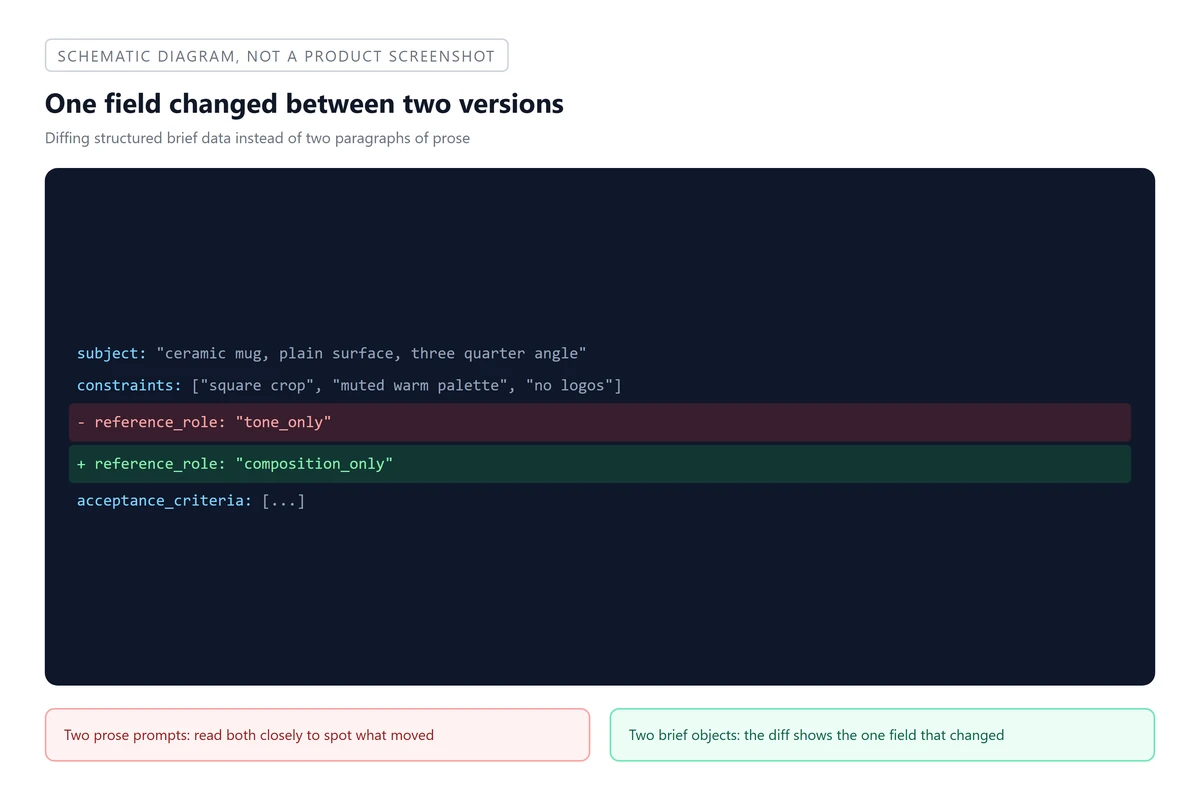 Schematic: diffing structured brief data shows exactly which field changed
Where This Breaks Down
The field-based approach does not replace judgment, and it is worth being honest about where it stops helping. Fields are good at capturing decisions that repeat: the same subject shot from different angles, the same product line run through the same constraints, a brief that a teammate will run without the author present. They are worse at capturing a genuinely exploratory session, where the point is to try five unrelated directions and see what happens, because forcing that kind of search into fixed fields tends to flatten it into something more literal than intended.
There is also a real cost to adding fields you do not need. A reference_role with five possible values and a constraints list with fifteen entries is harder to read and maintain than the two-sentence prompt it replaced, and at that point the structure is working against you rather than for you. The four fields here are a floor, not a target to expand indefinitely. Add a field only when you notice yourself writing the same clarification into a prompt more than once by hand.
Putting the Data to Work on a Canvas
Whatever renders the prompt still has to hand it to an actual image model, and a structured brief does not care which one. Because the fields do not encode anything model-specific, the same CreativeBrief object can render slightly different prompt text for different models, or the same prompt text can go to more than one model to compare results before picking one.
That comparison step is easier when the results land somewhere you can look at side by side instead of scattered across separate generation histories. A multi-model creative canvas is built for exactly that: results from different runs, and different models, sit on the same board so you can compare them and keep working from whichever one holds up, instead of starting a new session each time. One example is where a brief rendered into a prompt is just the input to whichever model you point it at next.
The brief itself does not change based on where it ends up. That is the whole reason to build it as data in the first place: the work of deciding what you want happens once, in the fields, and everything downstream, the prompt text, the model you send it to, the canvas you compare results on, reads from the same source instead of getting rewritten at every step.